Get to the file, then get back to work.
The complete guide to installing GrimDex, searching indexed NTFS volumes, and shaping a workspace of tabs, panes, and layout profiles that stays out of your way.
Find the right guide
Start with the task in front of you, or read straight through. Every section describes shipped behavior in the current build.
At a glance
| Capability | What it does |
|---|---|
| Whole-disk search | Indexes the NTFS master file table and follows the change journal, so matches appear as you type across your indexed drives. |
| Native Windows shell | Real right-click menus, drag and drop, and the system file icons you already know. |
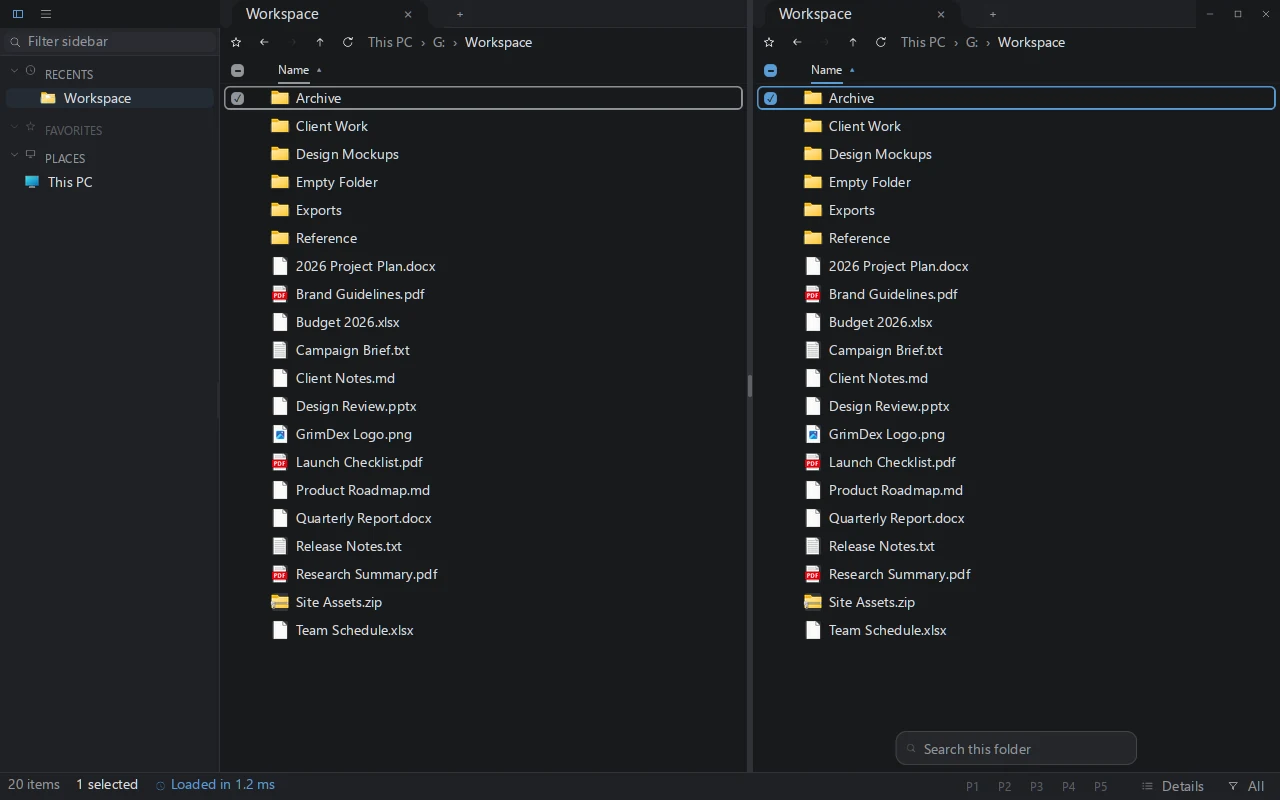
| Tabs and split panes | Split any pane side by side or stacked; each pane keeps its own tabs, path, search, filter, and view. |
| Tear-off tabs | Drag a tab out of its group to float it into its own window. |
| Layout profiles | Save layouts of pinned folders and bring them back from numbered chips. |
| File previews | Preview text and images inside Details view, with zoom for images. |
| Multiple views | Details, Icons, Columns, and List, chosen per pane. |
| Portable or installed | Run one executable in place, or install it per user without administrator rights. |
| Free during the beta | Use the beta without an account, payment, or activation; a purchased key activates from the app menu. |
Getting started
GrimDex is a single Windows executable. The same file can run portable or install itself for your user account, without administrator access.
Run portable
Download the portable zip, unzip it, and run grimdex.exe. Portable mode does not copy files, create shortcuts, or register GrimDex as the default folder handler.
Install for your user
Run grimdex.exe --install, or choose Install on the first-run screen. This copies the app into %LocalAppData%\GrimDex and creates Start Menu and Desktop shortcuts for your account. The first-run screen offers separate choices for a Desktop shortcut, Explorer right-click integration, default folder handling, and PATH integration, and lets you edit the install location. Nothing there is forced.
To pin GrimDex to the Start menu or taskbar, right-click its Start Menu shortcut and choose Pin to Start or Pin to taskbar.
Uninstall, and what is kept
Uninstall from the top-left menu, from Windows Settings under Apps, or with grimdex.exe --uninstall. All three remove the app files, shortcuts, and any folder-handler registration GrimDex added, and restore the previous default handler when one was replaced. Your settings stay on the machine, so a reinstall picks up where you left off.
Search indexed NTFS drives
GrimDex reads the file table that NTFS keeps for each drive and follows the volume's change journal, so its index stays current while you work. The indexed NTFS search path uses that index. Folder searches and other sources may use directory enumeration.
A partial index is built automatically at normal integrity, with no prompt. To request fuller NTFS indexing, press Ctrl+R; Windows asks once for permission to read the drives that need it. Press Ctrl+P to open the file palette and search from anywhere.
Search syntax
| Query | Matches | Example |
|---|---|---|
| plain text | names that contain the text, ignoring case | report |
ext: | one or more file extensions, separated by semicolons | ext:rs;toml |
file: | files whose name contains the term | file:report |
folder: | folders whose name contains the term | folder:projects |
path: | the full path, not only the file name | path:archive |
size: | files above or below a size | size:>100mb |
* ? | wildcards: any run of characters, or any single character | *.psd |
Combine terms with AND, OR, and NOT, and group them with parentheses to build a precise query. Results are presented in a bounded, sorted window.
Views
Each pane can show its listing as Details, Icons at extra-large, large, or medium size, Columns, or List. The view is per pane, so you can read one folder as a Details table while browsing another as large icons.
In Details view, selecting a text or image file opens a preview beside the listing. Text and images both preview in place, images can be zoomed, and each pane keeps its own preview target.
Tabs and panes
Every pane has its own tab strip. Split the focused pane side by side with Ctrl+\, or use the Split Side by Side and Split Stacked commands to divide it horizontally or vertically. Splits nest, so you can build a grid of panes, and dragging a divider resizes the panes on either side.
Each pane keeps its own path, tabs, search, type filter, view, and file preview, and none of them leak into the others. Move focus between panes with Ctrl+Alt and an arrow key, or click a pane.
Drag selected files or folders onto another open folder pane to copy them there. Hold Shift before releasing to move instead; the label beside the pointer names the destination and operation before anything changes.
Drag a tab and a compass appears over the pane under the cursor: drop on an edge to split the pane there, drop on the center to move the tab into that pane, or drop outside every pane to tear the tab off into a new window.
GrimDex only adds a split when both new panes keep a usable size, which depends on the window and display scale. When there is not enough room it declines and shows "Not enough room to split this pane" without changing your layout.
Layout profiles
A profile saves a set of pinned folders together with the split layout that holds them. Pin a tab with its star to mark it for saving; unpinned tabs are scratch and are never stored. Up to five profiles live on numbered chips, and the last one you used is restored at startup.
Loading a profile replaces the current scratch tabs with its pinned set. Nothing saves or reverts on its own: you save, reload, rename, or clear a profile explicitly, and if a slot has unsaved changes it asks before switching. If a saved folder is missing when a profile loads, that tab shows a Locate folder and Remove tab choice in place, so one offline drive never blocks the rest of the layout.
Keyboard and command palette
These shortcuts are part of the current build:
- Ctrl+P opens the file palette.
- Ctrl+R requests the full index for drives that need permission.
- Ctrl+\ splits the focused pane side by side.
- Ctrl+Alt and an arrow key move focus between panes.
The command palette runs named file-work commands, including Split Side by Side and Split Stacked. Navigation, keyboard-driven selection, and the shell menus below cover the rest of day-to-day file work.
Windows integration
GrimDex uses the real Windows shell rather than lookalikes. Right-click menus come from the same IContextMenu handlers Explorer uses, so archive tools, version control, and other installed extensions appear on your files. Drag and drop works into and out of the app, and file and folder icons are the system icons.
Optional integrations are yours to choose during install or on the first-run screen: an Explorer right-click entry to open a folder in GrimDex, setting GrimDex as the default folder handler for your account, and adding it to PATH. Default-handler changes are per user and are backed up, so uninstall restores whatever opened folders before. GrimDex never replaces explorer.exe as the shell.
Licenses and the beta
The beta is free without an account, payment, or activation. Download it from the home page.
A license is a one-time purchase: Personal ($39, one year of feature updates) or Lifetime Updates ($100). Both are perpetual and cover up to 3 PCs. Activate from the app menu: License & Updates, paste the key; the app checks online once, then verifies offline. The beta's closing date is announced on this site before it takes effect; licensed copies keep running. See pricing.
For purchase or product help, email support@grimdex.dev. Do not send private files or filenames.
Limitations
Honest boundaries of the current product, so you know what to expect before you rely on it.
| Limitation | Detail | Workaround |
|---|---|---|
| Instant search is NTFS only | Non-NTFS drives, such as FAT32, exFAT, and network shares, are not in the instant index. | They browse with standard folder listing. The Ctrl+P search palette also catalogs accessible removable drives, mapped network drives and WSL distributions. Coverage and freshness depend on the source; these are separate from the NTFS journal-backed index. |
| The full index needs one permission | Reading the NTFS master file table for every drive uses a one-time Windows permission prompt. | Decline it and search falls back to a partial index and standard directory reads. |
| Windows only | Runs on 64-bit Windows 10 or newer; there is no macOS or Linux build. | None |
| Portable mode adds no integration | Portable mode does not register the Explorer right-click entry or set default folder handling. | Install for your user to turn those on. |
| No paid-only features | The beta and a licensed copy run the same full product; a license buys continuity past the beta and its update window. | Buy when you want it; nothing is gated. |
| Beta closing date not set | It is announced on this site before it takes effect. | A license keeps your copy running regardless. |
Updates and help
Check for updates in the app menu fetches the current release from grimdex.dev; the app verifies the signed manifest and the file hash before it installs anything, and a prepared update applies when you restart.
An update check sends only the app version; see the privacy policy. For help, email support@grimdex.dev.
Getting help
Email support@grimdex.dev with the exact steps, your GrimDex version, your Windows version, and a screenshot with personal paths hidden. If it helps, attach the newest log from %LocalAppData%\GrimDex\logs. Please remove personal file names from anything you send, and never disable your antivirus to make something work.